Email Issue
You may get a message saying that you already have an account if you have previously used our website or you might find that when you press purchase the form takes you back to the Email Address input form.
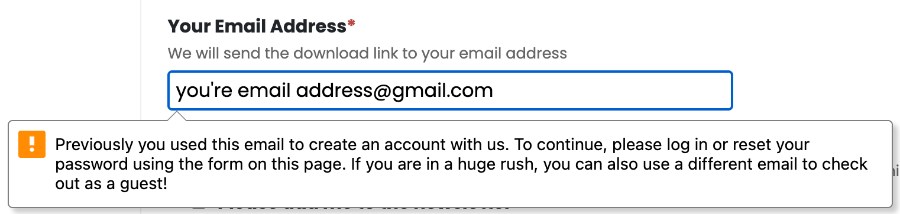
If you get this message and can’t complete the check out process then it’s because some time previously you created an account on the Go Chatter Videos. To continue the system requires you to log in. We’ve put a login and password reset form on this page. Once you’ve logged in you can return to the check out page and it will work.
Payment Issue
If you find that the Link Payment system is not working for your debit/credit card you can select to pay without Link.
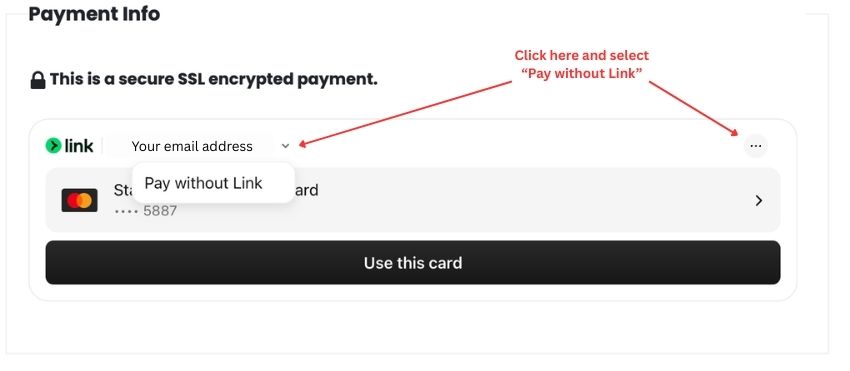
Somewhere on the Link Payment section you will see your email address. If you click that you should be able to then click a pop up that says “Pay without Link” or there might be an icon of 3 dots in the right hand corner that you can also click and then select “Pay without Link”. This will revert back to a payment gateway that allows you to enter your card details manually.
Contact Us
We want you to be able to get your resources particularly for Easter. If the check out process isn’t working. Please feel free to email me on dan@gochattervideos.com or if in the UK call on 07729 607 200